Team-Based
Classroom Play
Classroom Games
Interactive Game Rules for Team Play
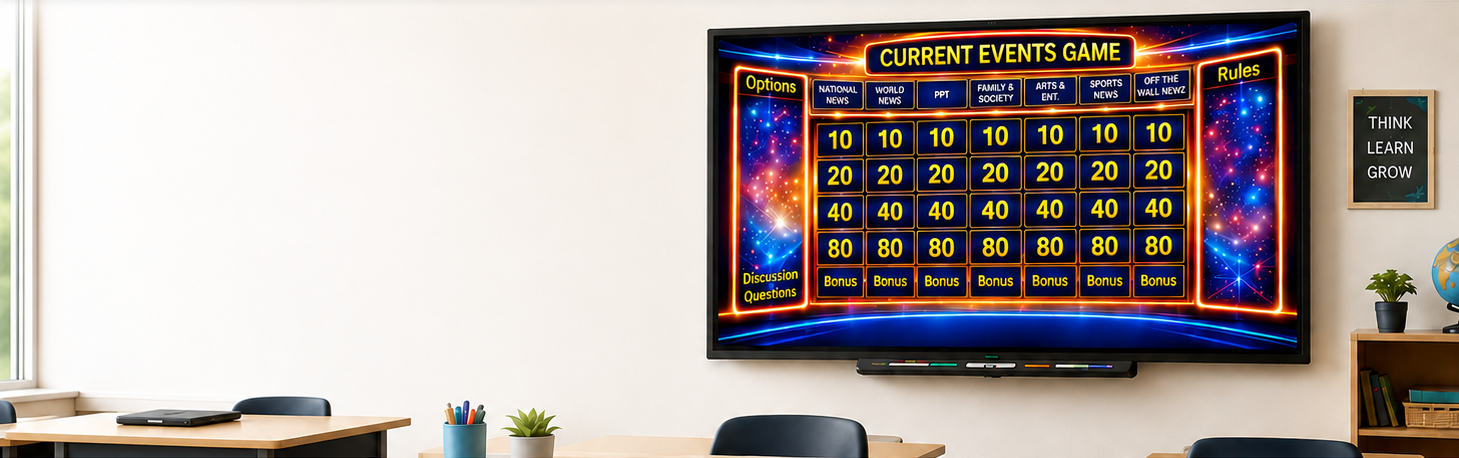
Use the NewzBrain interactive classroom board to run fast team competitions, strategy games, and high-energy weekly current events review.
Flexible Board
Options
Multiple Formats
from One Board
Before You Begin
Get the board and your classroom setup ready before the first team chooses a question.
- Divide the class into two to four teams and choose a captain for each team.
- Print or open the Interactive Teacher Answer Key before launching the board.
- Use the Options panel to decide whether choices are always shown, hidden, or shown only when requested.
- For scoring, NewzBrain recommends double points when teams answer without choices and half points when choices are used.
- Discussion Questions can be opened from the board whenever the teacher wants to pause for class conversation.
1
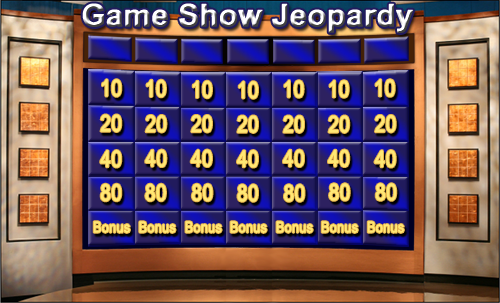
Jeopardy-Style Current Events Game
Classic team play using the interactive classroom board.
- Team 1 chooses a category and point value to begin.
- The teacher reads the question from the board and accepts the captain's answer.
- Correct answers earn the board value, with your choice-adjusted scoring rule if used.
- Missed questions can be stolen by the next team in order.
- Return to the board after each question and let the next team choose the next play.
Setup
- Display the interactive board for the whole class and keep the teacher answer key off-screen.
- Choose captains who will give the team's official answer and select the next question.
How to Play
- Team 1 opens the game by choosing any category and point value on the board.
- The teacher reads the question, listens for the team's answer, and then confirms whether it is correct.
- If Team 1 misses, the next team may steal. Continue clockwise until the question is answered or every team has had a chance.
Scoring
- Award the point value shown on the board when a team is correct.
- If you use the choices-based scoring option, double points can be used when teams answer without choices and half points when choices are shown.
Teacher Tips
- Use Bonus questions near the end for a final challenge, tie-breaker, or teacher's-choice closer.
- Discussion Questions are helpful when you want to pause the game and expand on a current event with the full class.

2
NewzBrain Wash
A fast-moving tally game that keeps every team listening.
- Each correct answer earns one tally instead of the printed point value.
- Teams can steal missed questions to stay involved on every turn.
- Bonus questions are saved for the end as wash questions.
- The leading team gets first chance at the final wash question.
- If the leader misses, the next leading team can answer and take the win.
Setup
- Use the regular interactive board, but tell students that every correct answer is worth one tally.
- Choose a simple scoreboard where teams can quickly see their running tally.
How to Play
- Run the board in team order just like the main interactive game, but count only tallies instead of board values.
- Allow the next team to steal when a team misses so every question stays active.
Scoring
- Every correct answer is worth one tally regardless of point value.
- Save the Bonus questions until the end and use one as the final wash question.
Teacher Tips
- This format works well when you want less score math and more rapid classroom participation.
- Use the final wash question as a clean closer even when teams are separated by only one tally.
3
Las Vegas NewzBrain
Add wagers, risk, and big swings to the interactive board.
- The team choosing the question makes a wager before the question is revealed.
- A correct answer earns the board value plus the wager.
- A miss subtracts the wager and opens the door for the next team.
- Teachers can cap wagers to keep the game balanced.
- For a lighter version, use half the board value as the wager.
Setup
- Explain the wager rule before starting so every team understands how risk changes scoring.
- Decide whether teams may choose any wager or whether the class will use a fixed half-value wager.
How to Play
- When a team selects a question, it announces its wager before the question is opened.
- If the team answers correctly, add both the point value and the wager. If it misses, subtract the wager and offer the question to the next team.
Scoring
- Use the board's point values as the base score and add or subtract the wager from there.
- Teachers may cap wagers so one risky play does not decide the whole game too early.
Teacher Tips
- If you want the tension without too much score tracking, use the half-point-value wager rule for every question.
- This format works best when teams are comfortable talking through strategy before locking in a choice.

4
Pigskin NewzBrain
Turn the board into a football field with possessions and drives.
- Treat 10, 20, 40, and 80-point questions as yardage plays.
- Teams drive down the field when they answer correctly.
- A miss ends the down or can trigger a turnover based on your class rules.
- Touchdowns, field goals, and bonus extra points create the final score.
- Steals can become takeaways, stops, or change-of-possession moments.
Setup
- Explain how each board value converts into football yardage before the first possession.
- Decide in advance how you want steals to work so students know whether a miss becomes a turnover or simply ends the play.
How to Play
- Teams choose questions as offensive plays and move down the field each time they answer correctly.
- If a team misses, you can end the possession, allow a steal, or hand possession to the next team based on the classroom version you prefer.
Scoring
- Reaching the end zone scores a touchdown.
- Bonus questions work well as extra points, and lower-value questions can be used as field-goal tries when teams are close enough to score.
Teacher Tips
- This format is especially useful when you want students discussing risk before choosing a short or long play.
- A quick football field sketch on the board helps students follow field position throughout the game.

5
Slam Dunk NewzBrain
Fast possessions, rebound chances, and lots of quick turns.
- Turn lower-value questions into free throws or two-point shots.
- Use 40 and 80-point questions as three-point shots.
- Correct answers score the shot for that possession.
- Missed answers create rebound chances for the next team.
- Bonus questions can act as buzzer beaters, overtime shots, or challenge rounds.
Setup
- Decide how your class will map question values to free throws, two-pointers, and three-pointers before tip-off.
- Set the possession order so rebound opportunities move smoothly from one team to the next.
How to Play
- Each selected question becomes a shot attempt. Correct answers score immediately for that team.
- When a team misses, the next team can rebound by answering that same question or by taking the next possession, depending on the pace you want.
Scoring
- Use the shot values you assigned at the start of the game and keep the scoreboard moving after every possession.
- Bonus questions are great for late-game situations such as buzzer beaters or overtime.
Teacher Tips
- This is one of the easiest formats to speed up when you want lots of student turns in a short block.
- Rebound opportunities help keep every team listening, even when it is not their original possession.
Ready to Launch the Board?
Pick the interactive version that fits your class and jump straight into this week's game.